


Digital signage is a fun, technology-infused way to post content compared to a plain bulletin board that is often overlooked. Content displayed on digital signage can feature flashy and bright colors, and screens often attract the attention of anyone around them where they can not only make a difference in how customers view menus, or catch the attention of sales and deals in a store–but they can also help managers to boost employee engagement and improve internal communications.
A content management system (CMS) like Samsung MagicINFO is one of the best ways to create interactive and immersive content that can catch the attention of staff. CMS software applications are crucial to incorporate with digital signage and are the first step to making a difference in any team, but is Samsung MagicINFO all that it’s cracked up to be?
Let’s see why so many people love Samsung MagicINFO, but mention other alternatives similar to it to make sure you’re getting the most out of your CMS platforms!
Samsung MagicINFO’s Author, Server, and Player: What You Need to Know About Their Three Core Components
Getting to know a CMS platform’s features before committing to the price of it is important!
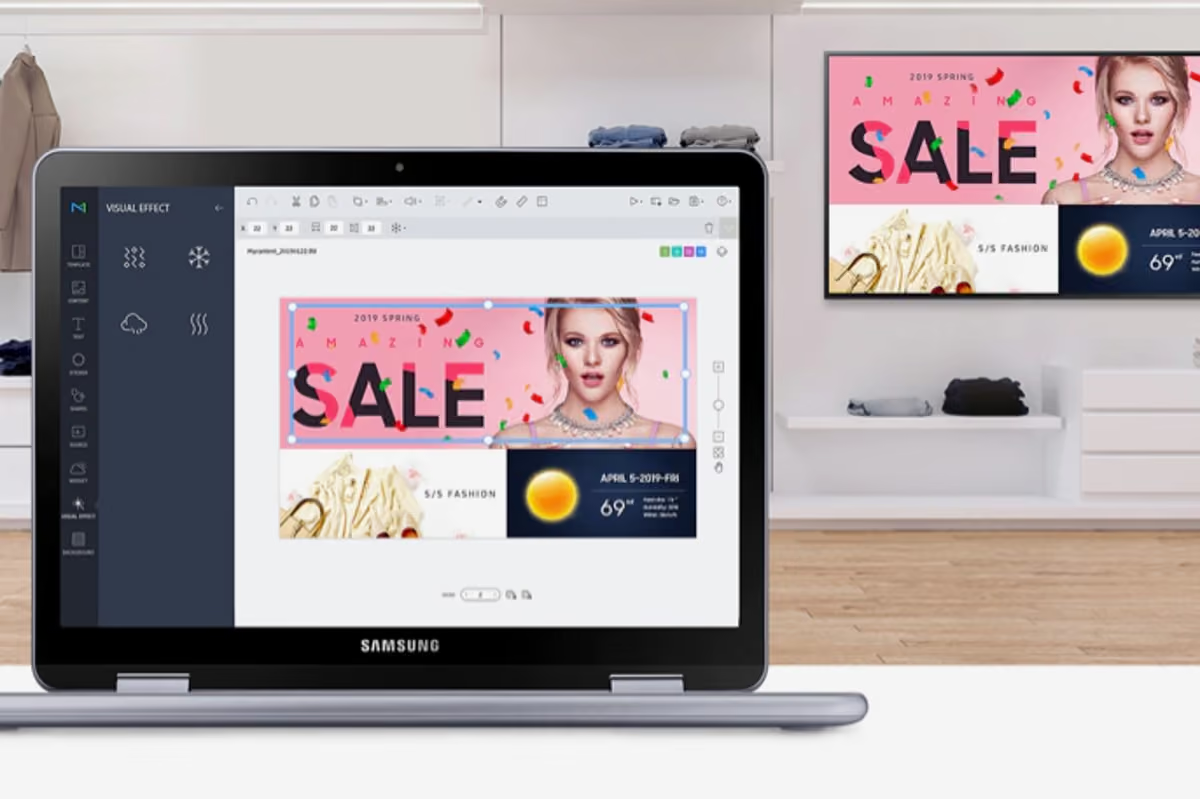
If you’re looking for an incredible CMS platform to create content with to deepen relationships with your team and boost communications and engagement, you may have stumbled across Samsung MagicINFO. Samsung is a popular South Korean technology franchise known for creating top-rated smartphones, but they also offer businesses a chance to connect with their staff through easy-to-use digital signage software to create, schedule, and manage content at any time, in any place.
What is Samsung MagicINFO?
When you’re thinking about a digital signage software that is perfect for your business, it’s important to make sure it has three main components–content creation, a place to manage and schedule your content, and a player to display and effectively show off your work. Samsung MagicINFO has its three main features–MagicINFO Author, Server, and Player.
MagicINFO Author allows users the right tools they need for designing content and creating unique playlists for staff to see everything from the latest company news, employee spotlights, and HR reminders.
Next is the MagicINFO Server which allows for users to distribute the content they create to one or specific digital signage screens. This also gives you remote management capabilities to organize and manage the content on connected displays, which can be available on-premises or via the MagicINFO Cloud where it can safely store your progress.
The final component of Samsung MagicINFO is the MagicINFO Player, which allows you to successfully play your content without any issues. This uses embedded software specifically within Samsung displays that helps to play content you create without needing any other digital signage media players and spending extra money.
One-of-a-Kind Features on Samsung MagicINFO
When creating immersive content for your digital signage screen, you want to make sure that you have the best features possible to create something that will be eye-catching to either customers or your team members.
Here are some of the most notable features that are available through Samsung MagicINFO:
Samsung MagicINFO Subscriptions to Consider
Usually CMS platforms provide a couple different subscription options depending on what you’re looking for and the features needed to create the right type of content for your business. Samsung MagicINFO offers two different subscription options–Lite and Premium–that provide a ton of unique features and a little extra if needed, plus either monthly or annual contracts to consider.
Samsung MagicINFO Lite is at an affordable price of $15 per month that provides the basics. It offers the cloud-based platform that is perfect for small to medium-sized businesses and offers basic content creation tools, scheduling and playlist management. There is also a one-time $98 setup fee that is charged for setting up your account and displaying your screens.
The next subscription is Samsung MagicINFO Premium–which stands at $32 per month–offers all of the perks of the Lite plan, plus more. With this option, users can take advantage of the advanced, all-in-one cloud service with features such as WebAuthor for extensive content creation, detailed scheduling, and easy device management that can occur anywhere at any time.
There are also two other subscription add-ons for Samsung MagicINFO which are services that can help make content creation, scheduling, and the other technicalities behind it much easier. While remote management comes free for most CMS platforms, it is a $5 add-on service. It is a specialized license for remote hardware control and monitoring that is an add-on many users tack onto their subscription. There is also the MagicINFO Maintenance Server, which is an annual service that gives users access to technical experts and support through the MagicINFO Maintenance Portal for any issues with functionality with proactive monitoring included.
Pros and Cons of Samsung MagicINFO: What We Love and Don’t With This CMS Platform
It’s important to get familiar with the pros and cons of any CMS platform even when they seem perfect!

There are pros and cons with every type of CMS platform with features that some do the best in while others lack in other fields. Samsung MagicINFO is an incredible CMS platform that can help tons of businesses engage with their customers and staff members more, but even an option that seems to have everything together can have its own pros and cons that current and past users have experienced.
Pro: Comprehensive Remote Management Capabilities
One of the biggest reasons why so many people love Samsung MagicINFO is because of its comprehensive management system to create, organize, manage, and schedule your content for display. While it may be $5 more a month on top of the version that you choose, Samsung MagicINFO allows users to remotely control their content and manage it all on one platform for easy use.
Con: High Monthly/Annual Subscription Cost
There are many CMS platforms that are super affordable or completely free to use and you can still create some of the best content possible to display on digital signage. Samsung MagicINFO is seen as expensive to many users with high monthly and annual subscription costs that can be hundreds of dollars every year just to create, control, manage, and schedule your own content. On top of that, there are extra add-ons if you want remote management–which is something that is usually free in almost all other CMS platforms–and even an option to have ultra-high security available for your business. There is also a $98 one-time fee to create and account and set up your screens on top of the given price as well.
Pro: Reliable Content Delivery For Users
Another reason why people do love Samsung MagicINFO and the features that it offers is because of its reliable content delivery, such as its advanced backup playback for when you lose an internet connection that helps to ensure that your content isn’t lost. It also allows users to manage their content anywhere with its cloud-based solution to enjoy creating content straight from the web, easy storage for it, and even a built-in media player to have everything you need when you get started.
Con: Learning Curve For Those New to Digital Signage
If you’re interested in Samsung MagicINFO for the features that it offers, it’s important to know beforehand that there is a steep learning curve to using their program–especially for the Premium version. Samsung MagicINFO Premium is a self-hosted version with extensive features that the average person may not be sure how to navigate. With some practice, learning how to use it can be picked up, but the Web Authoring feature can require some training or technical experience in order to successfully use it.
Samsung MagicINFO Alternatives: The Better Options to Consider for Content Creation
Interested in other affordable options for content creation? Here are some Samsung MagicINFO alternatives to keep in mind!

When choosing a CMS platform, it’s important to choose something that will work well for the business you work for in. Some CMS platforms work better for one industry over another, or maybe one has better features at a price that fits your company budget. Whatever the reasoning is, there are a ton of options to select from when choosing a CMS platform that will help boost engagement with either customers or staff in your business.
Here are some of the best alternatives to Samsung MagicINFO to consider before committing to anything!
- Shift
When choosing a CMS platform, maybe you’re looking for something that has features for boosting employee engagement. If so, Shift can be an incredible option to consider as it not only helps you to create content that will boost employee engagement and deepen relationships with staff, but it also has a unique Content Navigator feature with remote management capabilities at an affordable price.
- Samsung VXT
If you want to stay with Samsung, then MagicINFO’s successor–Samsung VXT–is also a great option if you want a cloud-based platform that has content creation, scheduling, and remote management included in an all-in-one platform. It is optimized for Samsung hardware and has an AI Studio App to create signage-ready content that is professional and ready to go quickly.
- Yodeck
Sometimes the high price point can be what deters many people from choosing Samsung MagicINFO where Yodeck is a much more affordable option with all of the necessary content creation features included. Not only is Yodeck completely free for users to use and create content with, but it has seamless integration capabilities to use alongside common applications you use daily–plus pre-made templates to make easy content at any time.
- Scala
Enterprise-level franchises usually require more high-end features when it comes to a CMS platform with the capability to manage thousands of digital signage screens. If your business needs more when it comes to a CMS platform, Scala is a great option that has a modern, cloud-based management system perfect for managing, scheduling, and deploying content to as many screens as you need.
- OptiSigns
Want to focus more on your team and engage with staff more? OptiSigns is another great alternative to Samsung MagicINFO and it is perfect for beginner content creators with little to no learning curve. It is ultra affordable, seamlessly integrates with other third-party applications, and users can even create more interactive content where you can implement AI cameras, QR codes, and motion sensors.
Create the Best Content Possible With the Top Samsung MagicINFO or an Alternative
Sometimes committing to a CMS platform doesn’t work because of its high cost, or maybe it’s lacking a feature your company needs. Samsung MagicINFO is a great CMS platform that provides everything you need, but it also has more affordable alternatives that can provide the same and more–which is also a reminder to keep your options open when choosing the best CMS platform for your business.
Consider using Shift as a Samsung MagicINFO alternative, or other CMS platforms to help bring your digital signage content to life!








.avif)