

A digital signage CMS is the platform that lets you create, schedule, distribute, and manage everything your screens display. It's where your marketing team builds a promotional campaign, where your IT department controls which screens show what content, and where your operations manager checks whether every display across twelve locations is online and up to date. Get it right, and your signage practically runs itself. Get it wrong, and you'll spend more time fighting the software than communicating with your audience.
Whether you're rolling out your first digital signage installation or replacing a legacy system that no longer meets your needs, we’ve laid out how to choose the right content management system for your digital signage. Our tips include:
- The key features any company should evaluate
- How to scale your network
- The importance of ease of use and pricing
- Questions to consider
- Making the final comparison
- Using Shift as your digital signage solution
Choosing a CMS—Key Features to Evaluate
Your CMS platform should provide solutions to these essential features

Content Scheduling
At its most basic, a digital signage CMS should let you decide what plays, where, and when. But the depth of scheduling capability varies widely between platforms, and for most organizations it's one of the most frequently used features in the system.
Look for dayparting — the ability to schedule different content for different times of day without manual intervention. A restaurant, for example, needs its breakfast menu showing at 7 a.m. and its lunch specials by 11 a.m. A retailer might want promotional content during peak shopping hours and brand storytelling content during quieter periods. Dayparting makes this automatic.
Beyond time-of-day control, evaluate how the platform handles recurring schedules, expiration dates, and priority overrides. Can you set a piece of content to run every Monday and automatically expire on a specific date? Can you push an urgent message to all screens instantly, overriding whatever is currently scheduled? These aren't edge cases — they're the kinds of tasks your team will perform regularly, and clunky scheduling tools will create friction every single time.
Also consider playlist management: how easy is it to build, reorder, and adjust content sequences? Can you set individual durations for each asset in a playlist, or does everything run for the same length of time? The more granular the control, the more professional and intentional your content will feel to viewers.
Template Builder
Not every organization has a dedicated design team, and even those that do don't want to spin up Adobe Creative Suite every time they need to update a price or swap out a promotional image. A strong template builder puts content creation in the hands of the people who need it most — marketers, operations staff, store managers — without requiring design expertise.
The best template builders offer drag-and-drop interfaces with a library of pre-built layouts that can be customized to match your brand. Look for support for your brand kit — the ability to upload logos, set brand colors, and lock certain design elements so that non-designers can't accidentally break the visual consistency of your signage.
Media Support
Your CMS is only as useful as the range of content it can handle. At a minimum, any platform worth considering should support standard image formats (JPEG, PNG, GIF) and video files (MP4 being the most common). But modern digital signage demands much more than static images and looping videos.
HTML5 support is increasingly essential. HTML5 content allows for animations, interactivity, and data-driven displays that static media simply can't achieve. If you want countdown timers, live charts, or branded motion graphics without relying on video files, HTML5 capability is non-negotiable.
Look also at support for live and streaming content — news tickers, live TV feeds, YouTube or Vimeo streams, and real-time data visualizations. Social media walls that pull in branded hashtag feeds or review scores are increasingly popular in retail and hospitality environments, and not every CMS handles them natively.
Integration Capabilities
Start by evaluating API availability. An open, well-documented API means your developers can connect the CMS to virtually any internal system — pulling live inventory levels from your warehouse management system, displaying wait times from your queue management software, or syncing promotional content with your e-commerce platform in real time.
Remote Management
One of the defining advantages of a cloud-based digital signage CMS over older, USB-based approaches is the ability to manage every screen in your network from a single dashboard, regardless of where those screens are physically located. But the quality of remote management tools varies significantly between platforms.
At minimum, look for the ability to push content updates instantly to individual screens, groups of screens, or your entire network simultaneously. Beyond that, evaluate bulk editing capabilities — can you update a piece of content across 200 screens in one action, or do you have to edit each screen individually?
Scalability & Network Management
Does your content management system allow you to scale and still manage effectively?

Screen Volume and Architecture
The first question is straightforward: how many screens can the platform actually support? Most cloud-based CMS platforms will tell you they scale to thousands of screens, but the more important question is how gracefully they do it — and what the management experience looks like at scale.
A platform that works beautifully for 10 screens can become genuinely unmanageable at 500 if the interface wasn't designed with large networks in mind. When evaluating scalability, ask vendors specifically about customers operating at your target scale and request references or case studies from organizations with similar network sizes and complexity. What works for a boutique hotel chain with 30 screens may be entirely inadequate for a national retailer managing 3,000.
Also consider the underlying cloud infrastructure. Is the platform hosted on a major cloud provider like AWS, Azure, or Google Cloud, with the redundancy and global distribution that implies? Or is it running on more limited infrastructure that could introduce latency or reliability issues as your network grows? For mission-critical deployments — airport displays, hospital wayfinding, financial trading floors — infrastructure robustness isn't a nice-to-have, it's a requirement.
Screen Grouping, Tagging, and Hierarchy
When you're managing more than a handful of screens, the ability to organize them logically is what separates a manageable network from a chaotic one. Look for a CMS that offers a flexible, multi-dimensional grouping system rather than a simple flat list of devices.
The most capable platforms allow you to tag and group screens along multiple axes simultaneously. A retail chain, for example, might organize screens by:
- Geography — country, region, state, city, store
- Placement — window display, checkout, fitting room, stockroom
- Content type — promotional, wayfinding, operational, brand
- Audience — customer-facing, staff-facing
Multi-Location and Multi-Tenant Management
Organizations that operate across multiple physical locations face a specific set of management challenges that not all platforms are designed to handle well. The core tension is between consistency and local autonomy — maintaining brand standards and operational control at the network level while giving individual locations the flexibility to communicate what's relevant to their local audience.
Is the CMS Easy to Use?
Because if you can’t use the CMS system, it’s not worth it

Onboarding Time and Learning Curve
Ask vendors directly: what does a typical onboarding look like? How long before a new user is independently managing content? Is there a structured onboarding program, or are new users largely left to figure things out from documentation? What does the first week look like for a team that has never used the platform before? The answers will tell you a great deal about how the vendor thinks about the user experience — and how much internal training time you should budget for.
Quality of the Interface
Evaluate the content editor specifically, since it's where most users will spend the majority of their time. Is the editing experience visual and immediate — what you see on the canvas is roughly what will appear on screen — or does it require abstract configuration that's hard to mentally translate into a finished result? Can users preview content before publishing, ideally in a simulated screen environment that reflects the actual display dimensions and aspect ratio? Surprises at the screen level, after content has been published, are one of the most common sources of frustration in digital signage workflows.
Accessibility for Non-Technical Staff
The most important indicator here is how the platform handles content creation for non-designers. Look for a library of professionally designed, customizable templates that give non-designers a strong starting point. The ability to swap images, update text, and adjust colors within a template — without needing to understand layout principles or design software — is what empowers a store manager to keep their screens current without escalating every update to a central team.
Keep Pricing Models in Mind
It’s essential to understand the pricing model behind your CMS for digital signage before you purchase
The Main Pricing Models
The digital signage CMS market has largely converged on a handful of pricing structures, each with its own advantages and trade-offs depending on the size and nature of your deployment.
- Per-screen licensing is the most common model in the industry. You pay a recurring fee — monthly or annual — for each screen or player device connected to the platform. Pricing typically ranges from a few dollars per screen per month for entry-level platforms to $20, $30, or more per screen per month for enterprise-grade systems with advanced features.
The challenge with per-screen pricing is that it can become expensive quickly as your network grows. A platform priced at $15 per screen per month feels manageable for 20 screens ($300/month) but becomes a significant line item at 200 screens ($3,000/month) or 500 screens ($7,500/month). When evaluating per-screen pricing, always model your costs at your projected network size two to three years from now, not just your current deployment.
- Flat monthly or annual fees are common among platforms targeting small to mid-sized businesses. Rather than charging per screen, these platforms offer unlimited — or generously capped — screen counts for a single fixed price, typically tiered by feature set rather than volume. This model is attractive for organizations that are scaling quickly, since adding new screens doesn't directly increase your software costs.
- Usage-based pricing is less common but worth understanding. In this model, costs are tied to consumption metrics — content delivery volume, bandwidth used, number of content updates pushed, or similar measures.
- Top Questions to Ask Before You Buy
- Can I try it before committing?
- Does it integrate with my existing tools (CRM, ERP, social)?
- What happens to my content if I cancel?
- How are updates and new features rolled out?
- What are other customers in my industry using?
Making the Final Decision
By the time you reach this stage, you've done the research. You understand your use case, you've evaluated features, you've stress-tested pricing models, and you've asked vendors the hard questions. But having all that information in front of you doesn't automatically make the decision clear. In fact, for many organizations this is precisely where the process stalls — overwhelmed by competing options, conflicting stakeholder opinions, and the very real fear of making an expensive, long-term commitment that turns out to be the wrong one. Here's how to bring structure and confidence to the final stage of your decision.
The most reliable way to compare platforms objectively — especially when multiple stakeholders with different priorities are involved — is to build a structured scoring matrix before you begin your final evaluation. Start by listing every evaluation criterion that matters to your organization — features, scalability, ease of use, pricing, support quality, and anything else that has emerged as significant through your research process. Then assign each criterion a weight that reflects its relative importance to your specific deployment.
Once your weighted criteria are defined, score each platform you're seriously considering against each criterion — typically on a scale of one to five or one to ten — and multiply each score by its weight to produce a weighted score. Sum the weighted scores for each platform to produce a total. This will help you make a decision on the content management system that’s right for your digital signage.
Go with Shift as Your Digital Signage Solution
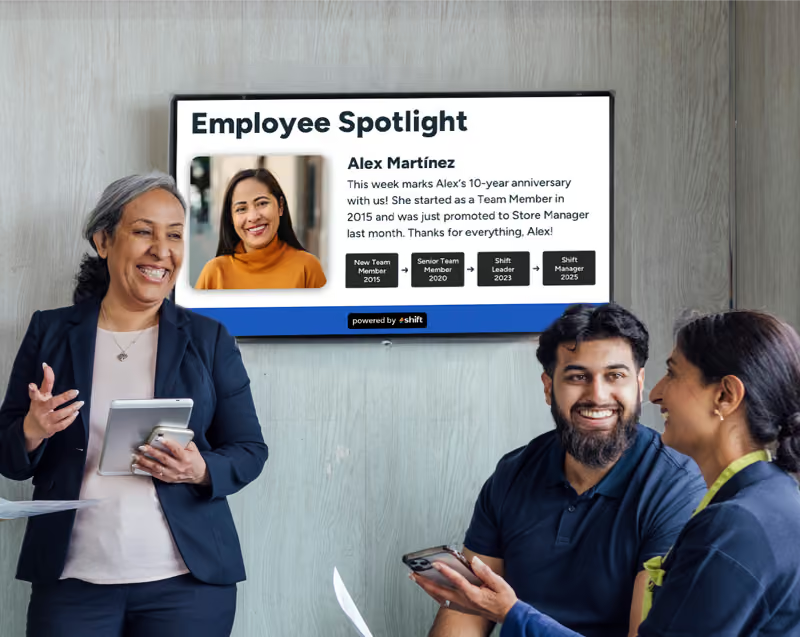
When you choose Shift as your digital signage platform, you’ll never need to worry about lack of compatibility with your chosen CMS. Shift makes creating content from templates incredibly easy to do, and can be scaled up as your business grows. Keep employees in the loop, recognize achievements, or improve morale and reduce turnover with the right CMS and Shift!








.avif)